
The bug recording tool that never leaves your machine
Record a replayable session, every console error, every network request and the exact steps to reproduce. Captain Octopus builds the bug report in your browser and redacts secrets before anything is saved.
- ✓No sign-in
- ✓No analytics
- ✓Redacted on your device
- ✓Export .zip, .html, .har
Available Across All Major Browsers
Captain Octopus is built to work seamlessly across all major browsers. We’re actively expanding support for more!
 Google ChromeAvailable Now
 Microsoft EdgeAvailable Now
 OperaComing Soon
 Mozilla FirefoxComing Soon
 ChromiumComing Soon
 BraveComing Soon
Watch the demo
A quick walkthrough of Captain Octopus — from install to first result.
From one recording to a bug report developers can replay
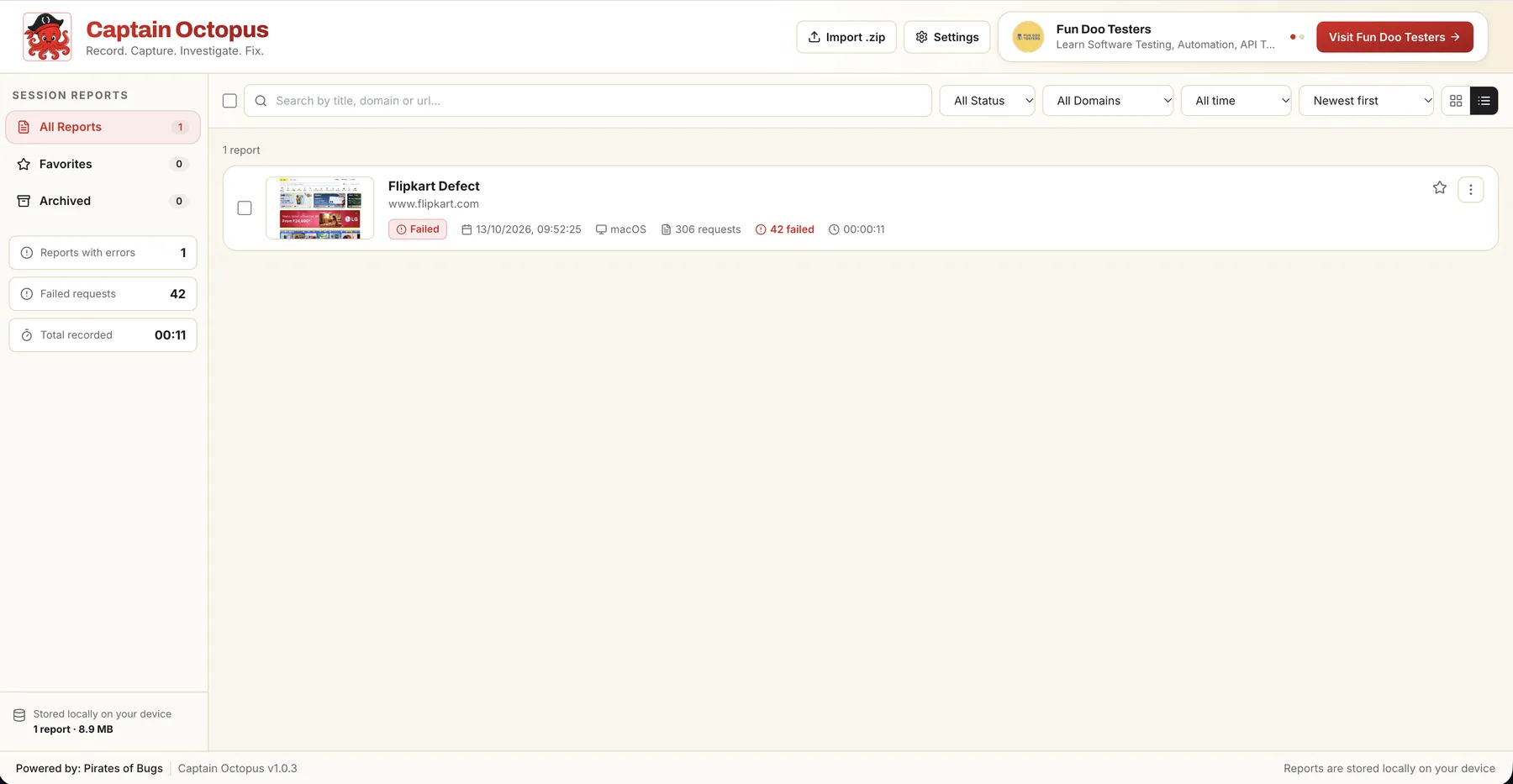
Every report, stored on your device
One dashboard for every bug you have recorded, with nothing synced to a server.
- ✓Search by title, domain or URL
- ✓Filter by status, domain and time; sort newest first
- ✓Favorites and Archive to keep things tidy
- ✓Storage counter shows reports and size kept locally
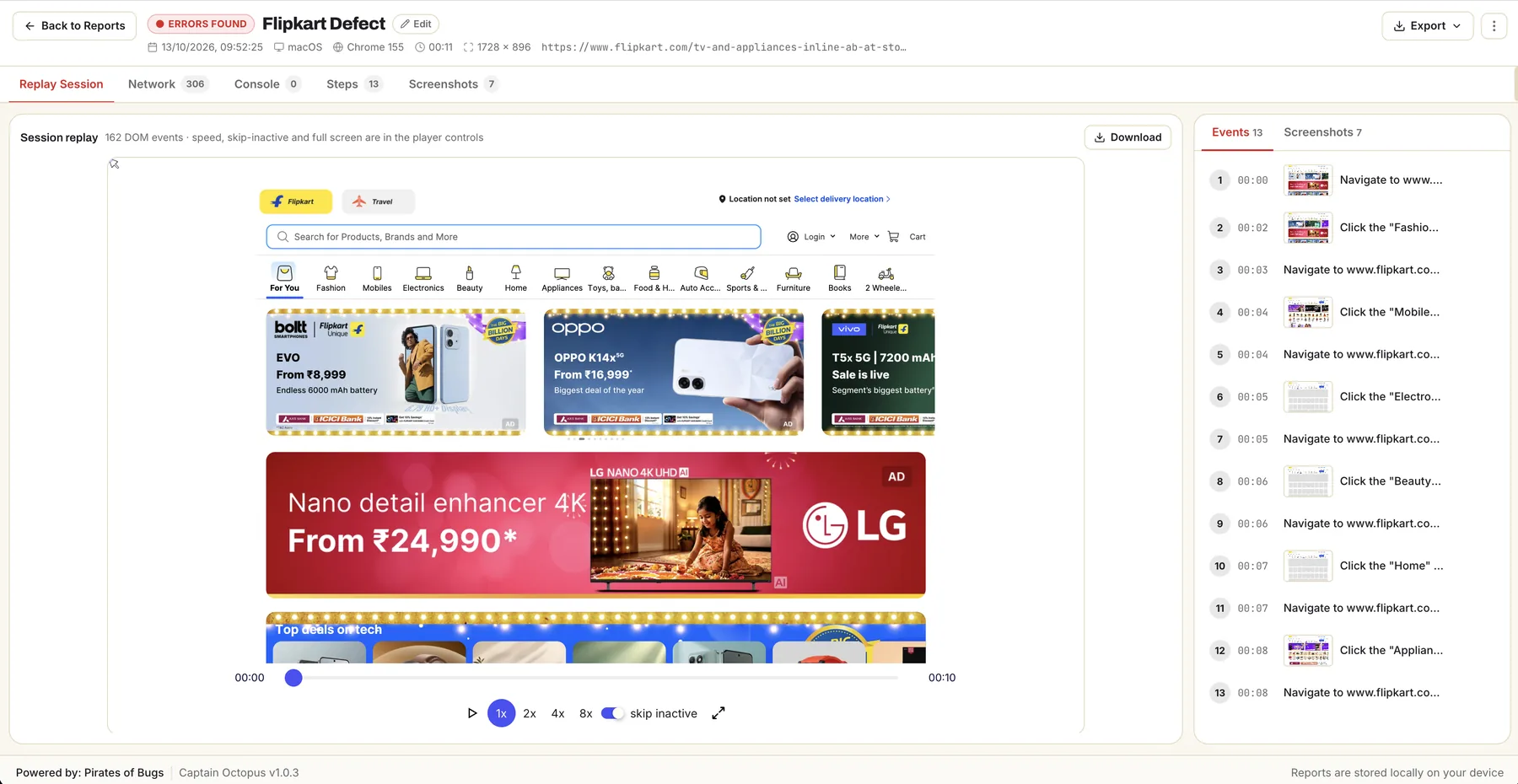
Replay the session, not a screenshot
Scrub through the page exactly as it changed, recorded as live DOM markup so text stays crisp and searchable.
- ✓Play back at 1x, 2x, 4x or 8x speed
- ✓Skip inactive time and go full screen from the player
- ✓An events timeline with a thumbnail for every action
- ✓Real page markup, not a video — so nothing is blurry
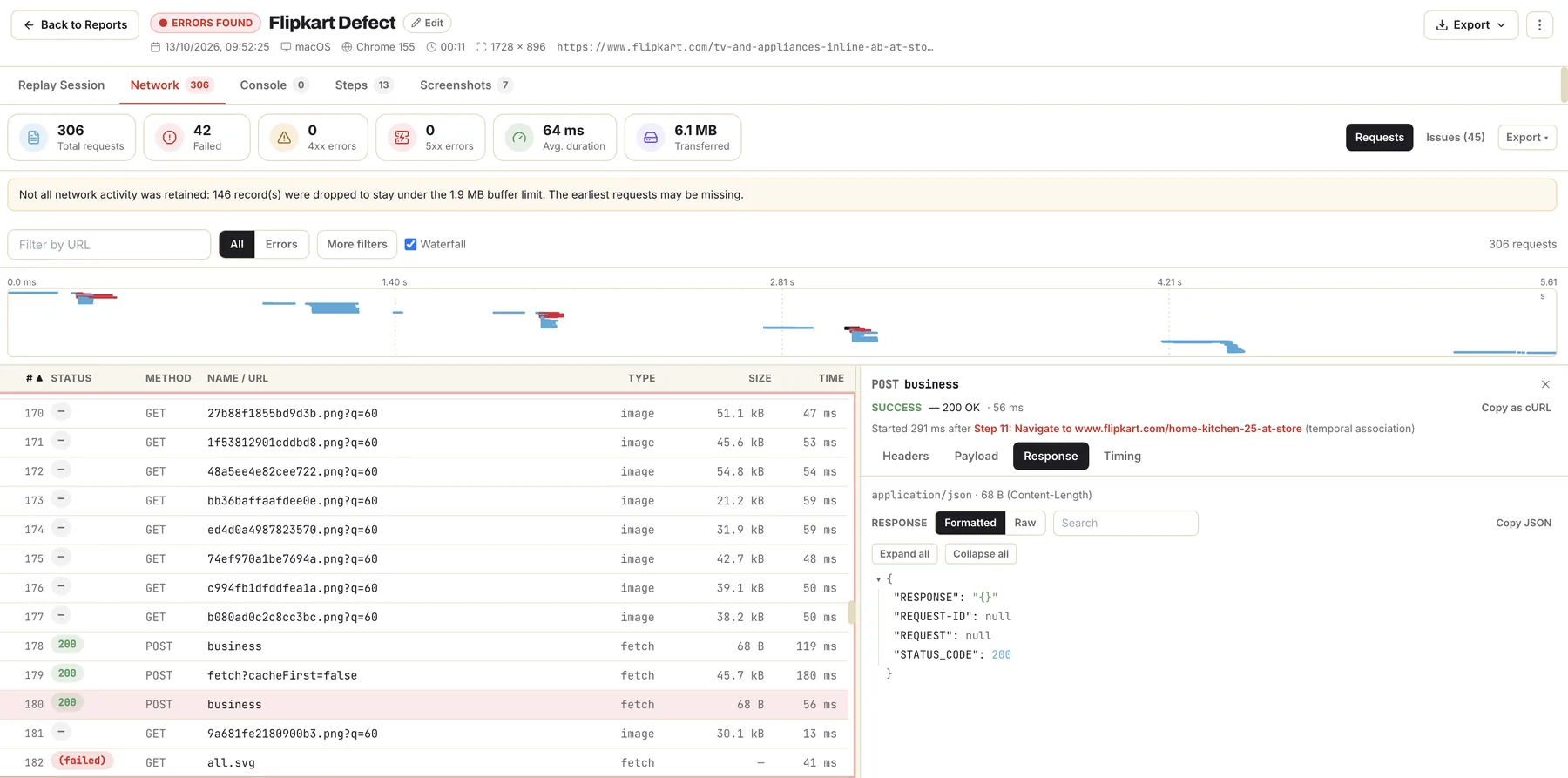
Every request, with a waterfall
Fetch and XHR with status, timing, headers and bodies — plus a waterfall, failure counts and an Issues view.
- ✓Totals for requests, failures, 4xx/5xx and data transferred
- ✓Waterfall timeline with a filter and an Errors-only toggle
- ✓Copy any request as cURL, or copy the JSON response
- ✓Requests link back to the step that triggered them
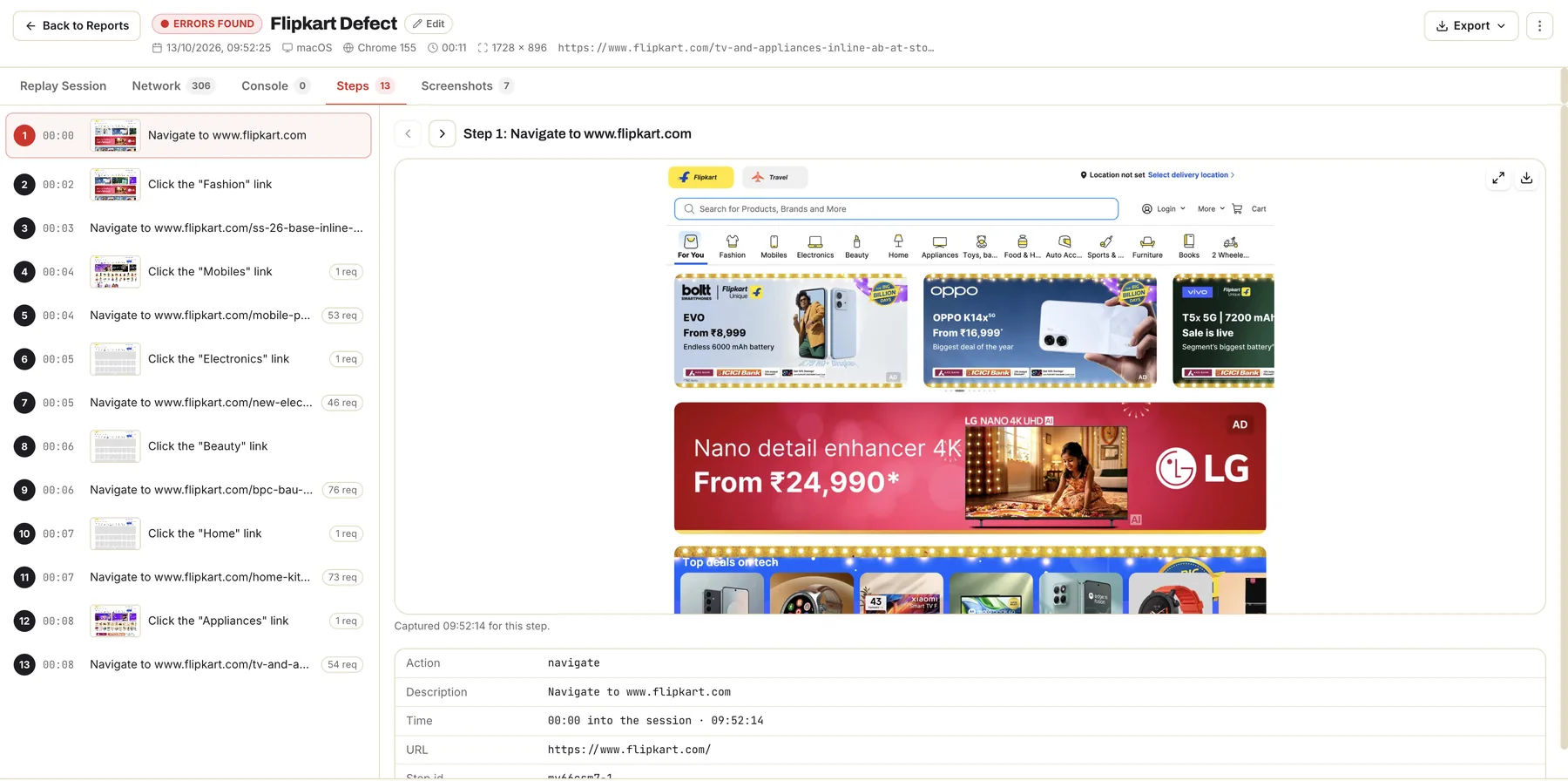
Automatic reproduction steps
Clicks, inputs and navigations become a clean, numbered list — the “how to reproduce” engineers always ask for.
- ✓Every action numbered automatically, with a timestamp
- ✓A screenshot captured for each step
- ✓A request count shown next to each step
- ✓Exported as a readable steps.md alongside the report
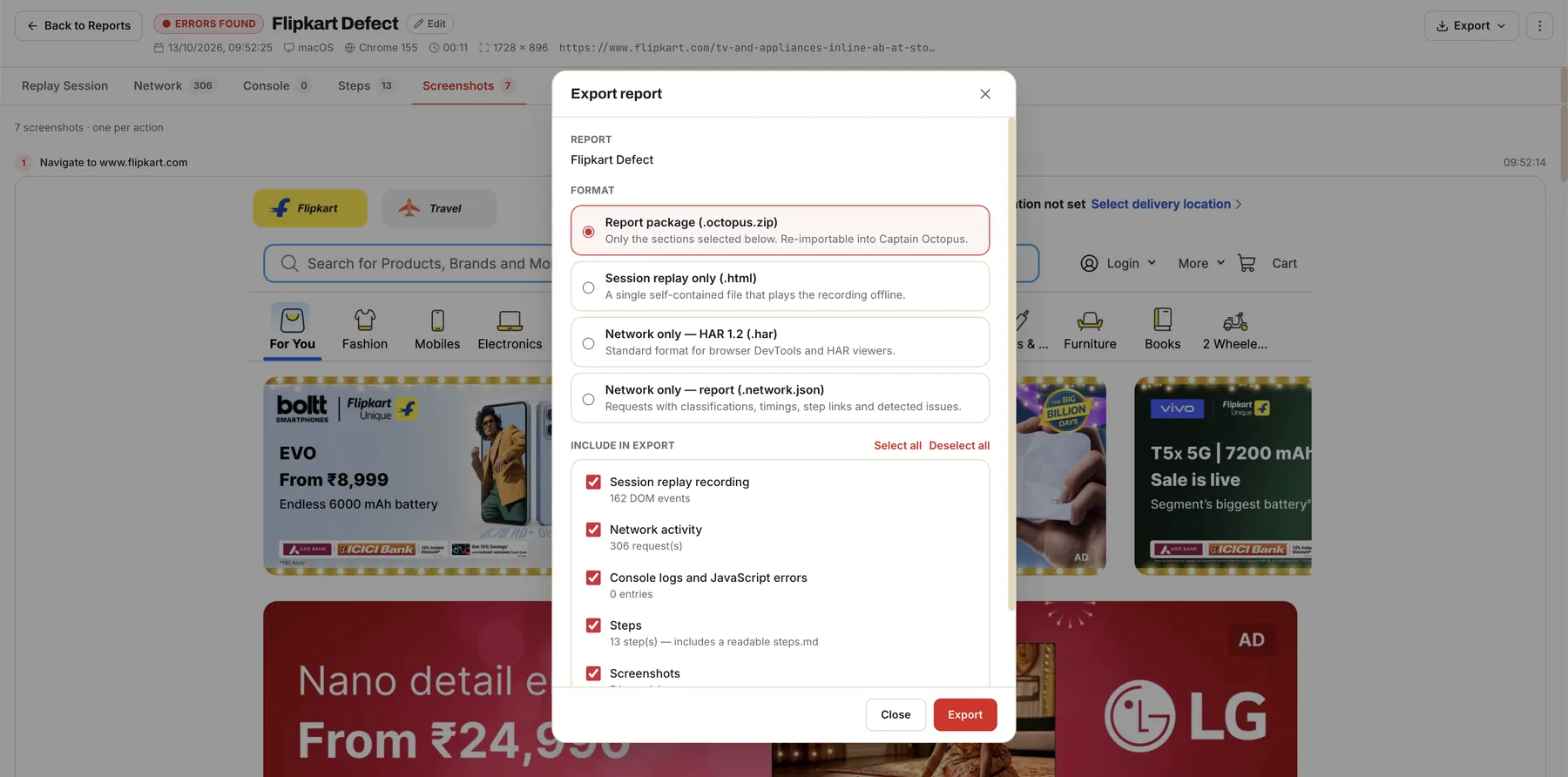
You decide what leaves
Pick the sections to include and export a file. A teammate re-imports the .octopus.zip to replay it on their machine.
- ✓Re-importable report package (.octopus.zip)
- ✓Self-contained offline replay (.html)
- ✓Network capture as HAR 1.2 (.har) or a report (.network.json)
- ✓Choose exactly which sections are included
Everything developers need to reproduce a bug, in one report
Session replay
Scrub through the page exactly as it changed, at up to 8x speed. Recorded as live page markup, so text stays crisp.
Console intelligence
Every log, warning and error, with arguments and stack traces, lined up with the replay timeline.
JavaScript error tracking
Uncaught exceptions and unhandled promise rejections are caught automatically, with what the user did just before.
Network investigation
Fetch and XHR with status, timing, headers and bodies, plus a waterfall, failure counts and copy as cURL.
Automatic repro steps
Clicks, inputs and navigations become a numbered list with a screenshot and request count for each step.
Flexible export
Share a re-importable .octopus.zip, an offline .html replay, a HAR 1.2 file or a network JSON report.
A bug recorder with no cloud to leak from
Everything is captured and redacted on your device. Nothing is uploaded. Reports live in your browser, with a storage counter so you always know what’s kept.
- ◆
Redacted before it’s stored. Auth and cookie headers, tokens, API keys, emails, card and SSN patterns, and password fields are masked by default.
- ◆
Your own rules. Add CSS selectors and regex patterns to mask anything else.
- ◆
Off until you press Start. Nothing is buffered in the background.
- ◆
You decide what leaves. Pick the sections to export; a teammate re-imports the .octopus.zip to replay it.
Record a bug report in three clicks
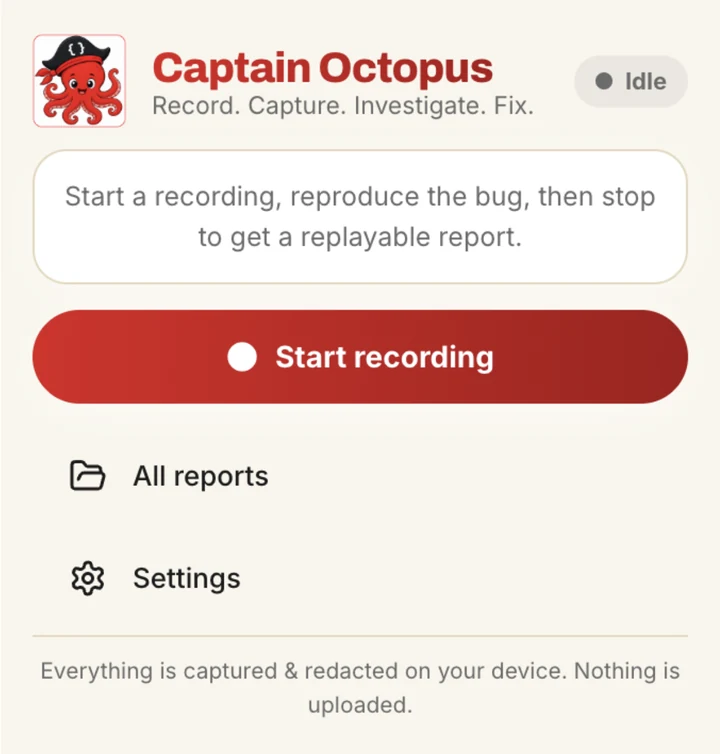
Start
Click the Captain Octopus icon and press Start recording. A small pill shows the tab is recording.
Reproduce
Do the thing that breaks. Octopus records the session, console, network and every step.
Stop and share
Press Stop. Your report opens in a new tab, ready to export and attach to any ticket.
Captain Octopus vs cloud bug recorders
Tools like Jam and BetterBugs upload reports to their cloud and share them by link. Captain Octopus keeps every report on your device.
| Captain Octopus | Cloud bug recorders | Screenshot + ticket | |
|---|---|---|---|
| Session replay | Yes, up to 8x | Yes | No |
| Console + JS errors | Yes | Yes | No |
| Network requests | Yes, with waterfall | Yes | No |
| HAR export | Yes, HAR 1.2 | Varies | No |
| Where data lives | Your device only | Vendor cloud | Your tracker |
| Account required | No | Yes | — |
| Share by link / tracker sync | No — export a file | Yes | — |
| Price | Free | Free tier + paid plans | Free |
Need hosted links and Jira sync? A cloud tool may fit better. Need data to stay on your machine? That’s what Octopus is for. Explore the free tools.
Debugging utilities that run in your browser
Bug recording FAQ
What is the best free bug recording tool for Chrome?+
Captain Octopus is a free, local-first bug recording tool for Chrome. It records a replayable session with the console, network requests and automatic reproduction steps, redacts secrets on your device, and never uploads anything — so you get a complete bug report without sending data to a vendor cloud.
Is Captain Octopus free?+
Yes. Captain Octopus is a free Chrome extension with no account and no paid tier. Install it, press Start recording, and you have the full feature set.
Does it upload my data?+
No. Recording, redaction, storage and the report viewer all run on your device. Reports live in your browser and a report only leaves your machine if you export the file yourself.
How do I share a bug report with my team?+
Export the report as a re-importable .octopus.zip (or an offline .html replay, a HAR 1.2 file, or a .network.json report) and attach it to any ticket. A teammate re-imports the .octopus.zip into Captain Octopus to replay it. There are no share links or cloud dashboards.
Is sensitive data hidden?+
Yes. Before a report is stored, Captain Octopus masks auth and cookie headers, tokens, API keys, emails, card and SSN patterns and password fields by default. You can add your own CSS selectors and regex patterns to mask anything else.
Is it a screen recorder?+
No. Captain Octopus records the DOM as live page markup rather than a video, so the replay is real, searchable markup you can scrub — alongside the console, network and reproduction steps, not just pixels.
Is it an alternative to Jam or BetterBugs?+
Yes, for teams that want their data to stay local. Tools like Jam and BetterBugs upload reports to their cloud and share them by link; Captain Octopus keeps every report on your device and shares by exporting a file. If you need hosted links and tracker sync, a cloud tool may fit better.
Stop arguing about bugs. Start replaying them.
Free, private, and ready in under a minute.
Add Captain Octopus to Chrome
We use analytics cookies to understand how the site is used. No personal data is sold. See our privacy practices before choosing.